Simply Schedule3.9
Publisher Description
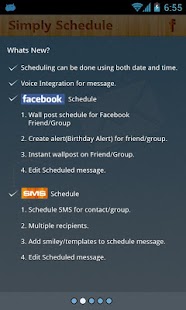
Simply Schedule allows you to schedule your SMS (text messages) and walls posts (on Facebook) and create alerts for a future date and time.
Some of the Features of this app are:
Facebook Scheduling:
1)Instantly post on people and groups’ walls through the app.
2)Schedule wall posts for future date and time.
3)Create reminders and alerts for certain events like birthdays, parties, etc. For birthday reminders, you can use the birth dates provided through Facebook or input the dates yourself.
SMS (Text Messages) Scheduling:
1)Schedule SMS (text messages) through the application.
2)Edit or delete scheduled messages.
3)Reply to or delete messages from your inbox. The message outbox contains both sent and scheduled messages.
4)Notifications for received and sent messages with added Privacy features. If the privacy feature is turned on “A message is received” will be displayed instead of the actual message during notifications.
Feel free to download this app and provide us with feedback and suggestion at info@braindigit.com
About Simply Schedule
The company that develops Simply Schedule is Braindigit. The latest version released by its developer is 3.9. This app was rated by 1 users of our site and has an average rating of 4.0.
To install Simply Schedule on your Android device, just click the green Continue To App button above to start the installation process. The app is listed on our website since 2013-02-17 and was downloaded 21 times. We have already checked if the download link is safe, however for your own protection we recommend that you scan the downloaded app with your antivirus. Your antivirus may detect the Simply Schedule as malware as malware if the download link to com.braindigit.sms.scheduler is broken.
How to install Simply Schedule on your Android device:
- Click on the Continue To App button on our website. This will redirect you to Google Play.
- Once the Simply Schedule is shown in the Google Play listing of your Android device, you can start its download and installation. Tap on the Install button located below the search bar and to the right of the app icon.
- A pop-up window with the permissions required by Simply Schedule will be shown. Click on Accept to continue the process.
- Simply Schedule will be downloaded onto your device, displaying a progress. Once the download completes, the installation will start and you'll get a notification after the installation is finished.
Program Details
System requirements
Download information
Pricing
Version History
version 3.9
posted on 2013-02-17
Several fixes and updates
version 3.9
posted on 2013-02-17
*Added Sms Notification with sound and vibration
